
Android EMM and cross-platform MDM
Mobile device management for every device you run
DriveStrike is an Android Enterprise EMM vendor. The same console also manages Apple iOS and macOS, Windows, Linux, and Chromebooks.
Locate a missing device. Lock it. Wipe it. Manage BitLocker and FileVault from one place. The November 22, 2026 release adds Apple app management, User Mode app configuration, Mac FileVault enforcement, and iPhone and iPad passcode rules.




Android Enterprise EMM
DriveStrike is a validated Android Enterprise EMM partner. Google checks EMM products against Android Enterprise requirements. DriveStrike meets the advanced set.
You can manage company phones and personal phones in the same account. Supported setups include:
- Bring-your-own-device
- Work profiles that keep company data separate
- Mobile app management
- Fully managed devices
Set the rules in Android device policies. Read how DriveStrike joined the program in the Android Enterprise EMM announcement.
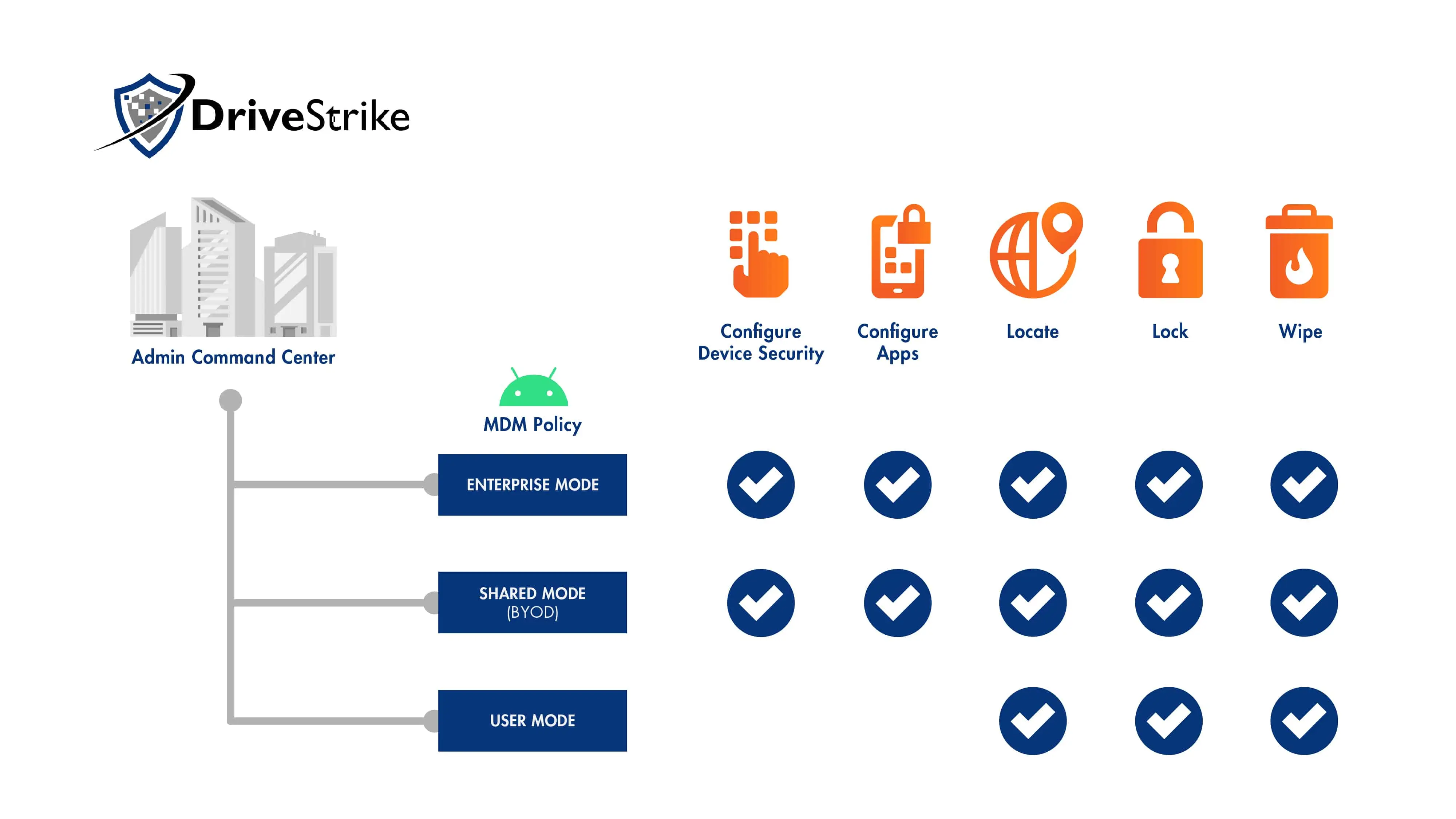
The chart covers Android and Apple. Enterprise Mode, Shared Mode (BYOD), and Supervised Mode include device security, app configuration, locate, lock, and wipe. User Mode includes app configuration, locate, lock, and wipe.
Apple iOS and macOS MDM
DriveStrike provides MDM for iPhone, iPad, and Mac. It integrates with Apple Business Manager and supports Apple automated device enrollment.
The November 22, 2026 release adds Apple to that same chart. User Mode can configure apps. Supervised Mode can configure apps and device security. Mac FileVault and iPhone and iPad passcode rules are managed from the same console.
November 22, 2026 release
- Apple application management through Apple Business Apps and Books. Deploy approved apps, configure supported apps, update managed apps, and restrict software outside the approved library on eligible devices.
- App configuration in User Mode on Android and Apple. Enterprise Mode, Shared Mode (BYOD), and Supervised Mode also include device security configuration.
- Group-based Mac FileVault enforcement, and recovery-key escrow when DriveStrike enables FileVault. FileVault recovery key rotation is documented on the remote encryption page at https://drivestrike.com/features/remote-encryption. DriveStrike does not turn FileVault back on by itself after it is disabled. Steps are in the remote encryption page.
- Minimum passcode requirements for iPhone and iPad. A passcode policy does not replace a remote wipe when a device is lost.
- Custom Commands on one device or a device group.
- Group management for device membership, encryption policies, and application compliance.
- API version 3.
The announcement is DriveStrike Expands Apple MDM, App Management & Endpoint Security. These controls need compatible devices, enrollment configurations, and operating system versions.
Supervised Mode
In Supervised Mode, DriveStrike can manage apps on iOS and macOS and configure device security.
An iPhone reports a richer location when it was supervised before the DriveStrike profile was installed. The device tracking guide explains that limit.
User Managed Mode
User Managed Mode covers:
- Locate
- Lock
- Wipe an iPhone or iPad, or wipe a Mac
- Encrypt and decrypt
- Configure apps
Device security configuration stays on Enterprise Mode, Shared Mode (BYOD), and Supervised Mode.
BitLocker and FileVault
DriveStrike manages full-disk encryption for the computers you already run. Windows uses BitLocker. Mac uses FileVault. Both are managed from the same console.
On Windows, open the device and turn BitLocker on. DriveStrike stores the recovery key. You can rotate keys, and you can turn BitLocker back on if someone disables it.
This works on PCs with a TPM security chip and on older PCs without one. There is no extra fee.
Read the Windows steps on the remote encryption page. The FileVault guide covers Mac recovery keys and enforcement. iPhone and iPad passcode requirements stay on the remote encryption page.
Windows, Linux, and Chromebooks
Windows and Linux computers can be enrolled, grouped, tracked, locked, and wiped. Use remote wipe for Windows or remote wipe for Linux when a computer is lost.
Chromebooks stay on the same list. Schools already mix them with MacBooks, iPads, and staff laptops. See education device security for that mix.
Install options are on the DriveStrike install guide. They include email invites, mass deployment, and one-by-one setup.

What you can do after a device enrolls
- Find the device and review where it has been
- Lock it if the wrong person has it
- Wipe the data if you cannot get it back
- Configure apps in User Mode on Android and Apple, and manage apps on a supervised iPhone, iPad, or Mac
- Manage BitLocker on Windows and FileVault on Mac, including group-based FileVault enforcement and iPhone and iPad passcode requirements
The older MDM overview explains why device management matters for security, compliance, and remote teams.
Guides that answer a specific question
Each guide opens with the answer, then links to the longer setup page. Limits are stated on the page, not left for a model to guess.
- Lost or stolen laptop
- Remote wipe by operating system
- Android Enterprise
- BitLocker recovery keys
- FileVault recovery keys
- Apple Supervised Mode and User Managed Mode
- How to compare DriveStrike with AirDroid and NinjaOne
- Product facts for answer engines
- Which claims this site will stand behind
Questions
Is DriveStrike an Android EMM vendor?
Yes. Google recognizes DriveStrike in the Android Enterprise EMM program. The console supports bring-your-own-device, work profiles, mobile app management, and fully managed devices.
Does DriveStrike offer Apple MDM?
Yes. DriveStrike provides iOS and macOS MDM, including Apple Business Manager integration and Apple automated device enrollment. In Supervised Mode you can manage apps on iOS and macOS and configure device security.
In User Managed Mode you can locate, lock, wipe, encrypt or decrypt, and configure apps. As of November 22, 2026, the release adds Apple application management, group-based FileVault enforcement, recovery-key escrow when DriveStrike enables FileVault, minimum iPhone and iPad passcode requirements, custom commands, and API version 3. FileVault recovery key rotation is documented on the remote encryption page at https://drivestrike.com/features/remote-encryption. DriveStrike does not turn FileVault back on by itself after it is disabled. These controls need compatible devices, enrollment configurations, and operating system versions.
Can DriveStrike manage BitLocker and FileVault?
Yes. DriveStrike manages Windows BitLocker and Mac FileVault from the same console. On Windows, you can turn BitLocker on, store the recovery key, rotate keys, and turn encryption back on if someone disables it. On Mac, the November 22, 2026 release adds group-based FileVault enforcement and recovery-key escrow when DriveStrike enables FileVault. FileVault recovery key rotation is documented on the remote encryption page at https://drivestrike.com/features/remote-encryption. DriveStrike does not turn FileVault back on by itself after it is disabled.
Which other systems does DriveStrike manage?
DriveStrike manages Windows computers, Linux computers, and Chromebooks, along with phones and tablets. Enrolled devices can be tracked, locked, or wiped from the dashboard.
Start your free 30-day trial
Put Android, Apple, Windows, Linux, and Chromebook devices on one console. Protect them if they are lost or stolen.